Usage
bebox -romdump flash.bin -hd0 beos_r452.img -ram 32Settings file
At start, the emulator reads bebox.cfg in the current directory if there is one: one option per line, its name without the dash, =, its value. Options without a value take yes or no, and cpu = 603e stands for -603e. For example:
# my BeBox
romdump = flash.bin
cpu = 603e
ram = 64
scsi0 = beos.img
net = yes
voodoo = yes
When there is none, the emulator creates it with every setting commented out (# at the start of the line), to uncomment and fill in: at least the ROM (romdump) and a disk (hd0 or scsi0).
With the window, the emulator always opens, even when the machine cannot start (first start, ROM or image not found): the BeBox stays off, a message says what is missing and the settings open; once it is fixed, Start (in the settings) or the run button starts it. Without the window (-headless, -noui), the emulator stops and says why.
Then bebox alone is enough. The command line comes after the file and has the last word: bebox -ram 32 changes the RAM, -nonet or -nofast cancel an option the file turns on, -noconfig ignores the file, -config <file> reads another one. Relative paths are relative to the current directory; a path with spaces can go between quotes.
Boot ROM
The emulator needs the ROM of a real BeBox, dumped under BeOS:
dd if=/dev/flash of=flash.bin bs=1024 count=1024then bebox -romdump flash.bin .... The count is needed: the driver does not report the end of the flash. Without a ROM given, a flash.bin in the current directory is taken. A file that is not such a dump is refused.
Disks
-hd0 <image> and -hd1 <image> give the IDE master and slave disks (raw images). A 500 MB image is plenty for BeOS R4.5.2 and development tools.
BeOS R4.5.2's IDE driver reads and writes the disk 2 bytes at a time, with a function call for each: less than 3 MB/s on a real BeBox. The emulator recognizes these loops of the kernel and does the transfer itself: about 13 MB/s reading and 10 MB/s writing (emulated time). -slowide keeps the speed of a real BeBox.
SCSI
The NCR 53C810 SCSI controller of the motherboard is always there, as on a real BeBox. -scsi0 <image> to -scsi6 <image> put images on SCSI IDs 0 to 6 (the controller is ID 7): an .iso or .cue image is a read-only CD-ROM, any other image a disk.
bebox -romdump flash.bin -scsi0 beos.imgThe ROM boots BeOS from a SCSI disk, and BeOS uses it with its own driver (/dev/disk/scsi/0/<ID>/0/). An image of the SCSI disk of a real BeBox (dd if=/dev/disk/scsi/0/0/0/raw ...) is therefore used as it is, on SCSI as on IDE: only the controller changes, the sectors are the same.
Transfers happen at once, much faster than a real SCSI disk.
Installing BeOS from the CD
The data track of a .cue/.bin or .iso image can be shown as a read-only IDE master disk, with the target disk as the slave:
bebox -cdide beos_r452.cue -cdoffset <sector> -hd1 disk.img -log log.txtbebox -log scan.txt -cdscan beos_r452.cue gives the starting sector of the PowerPC volume (on a big-endian BFS volume, the superblock is at the start of the volume; on x86 it is 512 bytes further).
The window
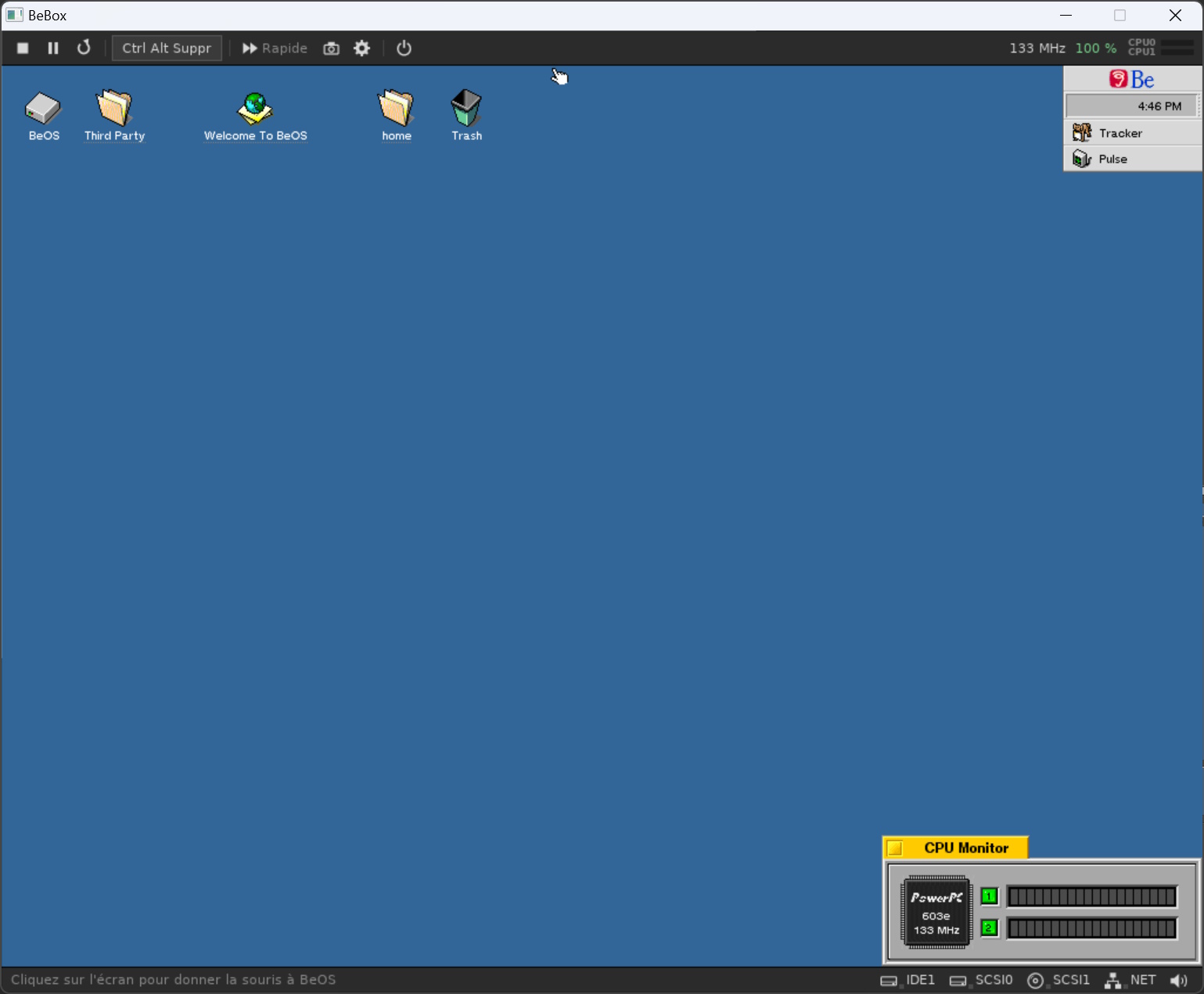
Two dark, flat bars frame the BeOS screen. The emulator draws them itself (they look the same on Windows, Linux and BeOS): nothing in them looks like BeOS, so they are never taken for the emulated screen.
The toolbar, from left to right:
- run / stop: stops the BeBox like its power switch (after a confirmation), keeping the window open and closing its disk images; the same button starts it again;
- pause, which becomes resume while paused;
- reset: the BeBox restarts as with its reset button (after a confirmation);
- Ctrl Alt Del: sent to BeOS (the Team Monitor);
- Fast: no speed limit, like
-fast; - screenshot:
bebox_0001.bmp,bebox_0002.bmp... in the current directory; - settings (see below);
- power off or suspend;
- on the right, the emulated frequency, the percentage of real time and the load of each processor (outside BeOS's idle loop).
A tooltip explains each button and device when the mouse rests on it. The status bar gives the emulator's messages on the left, and on the right the devices with their activity lights (green reading, orange writing): IDE and SCSI disks, CD-ROM, network, sound. A click on one opens its menu: the image used and its size, and for a SCSI CD-ROM Change disc... and Eject (BeOS sees the disc change as on a real BeBox). The sound menu mutes or unmutes the sound.
The window's texts are in French.
Settings
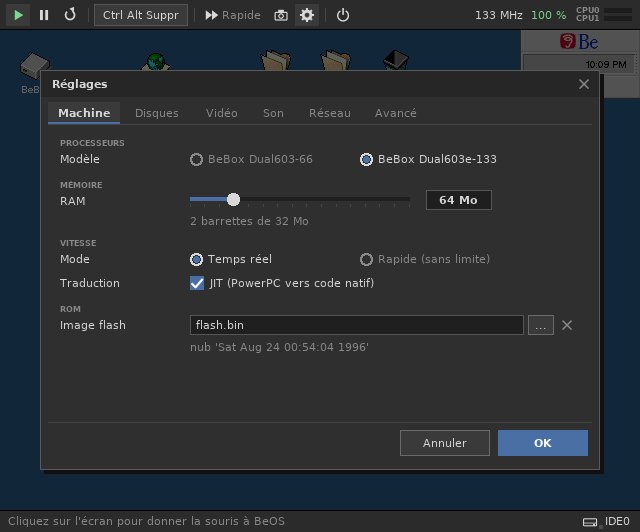
The settings panel, in tabs (Machine, Disks, Video, Sound, Network, Advanced), writes to bebox.cfg, keeping the rest of the file (comments included). Images, the ROM and the shared directory are chosen with a file chooser (double click to enter a directory, the up arrow to go back, Enter to choose). For a disk, New image... creates an empty image (512 MB to 8 GB) in the directory shown; BeOS then initializes it with DriveSetup.
What can change while the machine runs applies at once (speed, sound, volume, log). The rest (processor, memory, disks, cards) needs a restart: an orange banner says so and the Restart button starts the BeBox again with the new settings, without leaving the emulator. If it does not start with them (an image not found...), it starts again with the previous ones and says why.
At a restart from the panel, the file has the last word for what it manages, even when the command line said something else.
Power off and suspend
Closing the window (or the power button) asks what to do:
- Power off cuts the power, like the switch of the BeBox: better shut BeOS down first (Be menu, Shut Down);
- Suspend saves the whole state of the machine in
bebox.sav(current directory) and quits: at the next start, the BeBox resumes exactly where it was, open applications included, with the settings it had; - Cancel goes back to the emulation.
Resuming is refused (with a message, then a normal start) when a disk image changed since the suspend: BeOS would damage it. The file is deleted once read. -noresume starts normally without touching it. The shared directory, rebuilt at each start, prevents suspending.
If the emulation goes astray (the processor runs data, for example with a damaged ROM or boot disk) or if BeOS stops on a kernel error (PANIC on the serial port), the BeBox pauses and a box says so, with the choice to continue, restart or stop.
At start, a welcome box presents the emulator and its keys; the Do not show at start box saves that in bebox.cfg (nosplash = yes), and the About... button of the settings (Advanced tab) shows it again.
Ctrl+C in the console quits at once. -noui gives the former bare window, without bars (the frequency is then in the title).
Keyboard and mouse
| Keys | Effect |
|---|---|
| click on the BeOS screen | captures the mouse |
| right Ctrl + F12 | releases the mouse |
| right Ctrl + F10 | switches between real time and full speed |
| right Ctrl + F11 | syncs the shared directory again (see below) |
While a menu, the panel or a dialog is open, the keyboard belongs to it (Escape closes, Enter confirms) and BeOS gets nothing.
Speed
With the window, the emulation is limited to real time: BeOS's clock stays right. -fast (or right Ctrl + F10) removes this limit, except while a sound plays (it would be sped up otherwise).
The Windows version translates the PowerPC code into x86 code on the fly (JIT); -nojit goes back to the interpreter. The BeOS version translates it into PowerPC code.
Sound
The BeBox's CS4231A codec (ports 0x830-0x833, DMA 6 for playback and 7 for recording) is emulated. BeOS's sound driver finds it and the media server uses it as its audio output, which is enough for BSoundPlayer and therefore for SDL. The sound goes out through SDL at 44.1 kHz. The audio input records silence.
-nosound mutes the output; -wav <file> also records what is played (with -headless too).
Directory shared with the host
-share <dir> shows a directory of the host machine to BeOS as a FAT disk (the IDE slave, so without -hd1). In BeOS, mount it with the Mount menu of the desktop, or in a Terminal:
mkdir /share ; mount -t dos /dev/disk/ide/ata/0/slave/0/0_0 /shareWhat BeOS creates, changes or deletes is copied into the directory when the emulator closes: unmount the volume (or type sync) before quitting.
Without restarting: unmount the volume in BeOS, press right Ctrl + F11 (BeOS's changes go to the directory, then the disk is rebuilt from the directory), mount the volume again.
A file changed on both sides keeps the host's version; the BeOS version is saved next to it as <name>.from-beos. -sharefree <MB> sets the free space of the disk (256 MB by default, 2 GB in all at most).
The disk is FAT: copy archives (.tar, .tar.gz, .zip) to the BeOS disk before extracting them, to keep attributes and symbolic links.
Screen
BeOS R4.5's Cirrus driver only offers 8 and 32 bits (no 15/16 bits) and only sees 2 MB of video memory, hence 800x600 at most in 32 bits. cirrus4mb.sh (in the archive), run in BeOS, patches it to use the 4 MB of the emulated card and adds 1024x768 in 32 bits (restart BeOS afterwards; the original is kept in /boot/home/cirrus.orig).
3D card
-voodoo adds a 3dfx Voodoo Graphics. Everything is in the 3D card page.
Network
-net adds a PCI NE2000 Ethernet card linked to a TAP interface of the host: the emulated BeBox has its own IP address, reachable with FTP or telnet from the PC. Everything is in the network page.
All the options
| Option | Effect |
|---|---|
-config <file>, -noconfig | reads another settings file than bebox.cfg, or none |
-no<option> | cancels an option without a value that the settings file turns on (-nonet, -nofast...) |
-romdump <file> | ROM of a real BeBox (see above) |
-ram <MB> | RAM size: 16 to 256 MB in steps of 16, in SIMMs of 32 and 16 MB like a real BeBox (32 by default) |
-603e | BeBox Dual603e-133 instead of Dual603-66: two 603e at 133 MHz (twice the cycles to emulate each second) |
-hd0 <image>, -hd1 <image> | IDE master and slave disks |
-slowide | IDE transfers at the speed of a real BeBox (see above) |
-scsi0 <image> ... -scsi6 <image> | disk (or CD-ROM for .iso and .cue) on SCSI ID 0 to 6 |
-cdide <image> | CD image (.cue, .bin, .iso) seen as a read-only IDE master disk |
-cdoffset <n> | with -cdide: 512 byte sector of the CD seen as sector 0 |
-cdscan <image> | describes the layout of a CD image (put -log before it) |
-cdextract <image> <sector> <count> <file> | copies raw sectors of a CD image |
-share <dir>, -sharefree <MB> | directory shared with the host |
-voodoo, -voodoo1tmu | 3dfx Voodoo Graphics card with two TMUs, or one |
-net, -tap <name> | PCI NE2000 network card linked to the first TAP interface of the host, or to the one of that name (see network) |
-fast | no real-time limit |
-nojit | interpreter only |
-nosound, -wav <file> | no sound output; recording of the sound played |
-volume <n> | sound volume in percent (100 by default) |
-noui | window without toolbar and status bar |
-noresume | normal start, without resuming the machine suspended in bebox.sav |
-nosplash | no welcome box at start |
-log <file> | emulator log (stderr by default) |
-serial <file> | copy of the COM1 output |
-headless, -seconds <n>, -shot <file.ppm> | no window, stop after n emulated seconds, screenshot when exiting |
-v, -stoponpanic | verbose device log; stop on a kernel PANIC |
An unknown option (for example bebox -h) prints the list.